

Guide on how to check switch when the machine cannot be Powered On
The Machine has two power sources. Check the Main Power Switch and the Power Key for the status.
For the Older Machine series / Non I-Series Machine
STEP 1 – Check whether the power plug of this machine is firmly plugged into the power outlet.
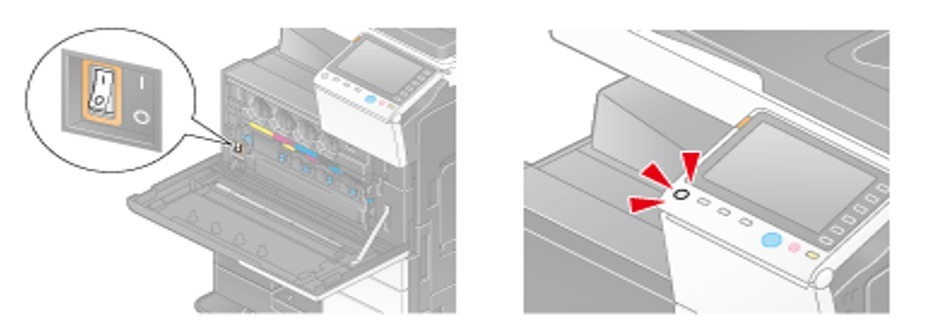
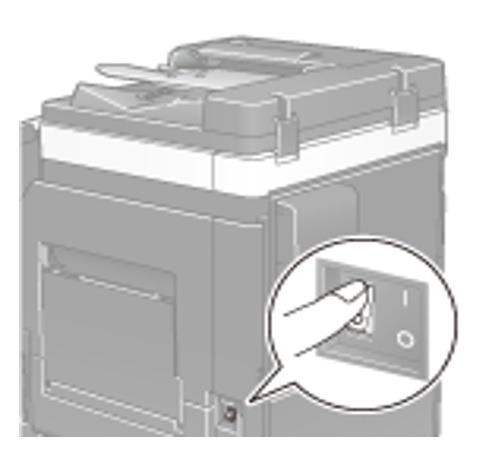
STEP 2 – Check to see that the Main Power Switch and the Power Key are turned ON. The Main Power Switch will be able to seen once the cover that showing toner cartridge has been open or either is located nearby of the bypass tray. I Icon is indicated ON and O Icon is indicated OFF.
For the Newer Machine series / I-Series Machine
STEP 1 – Check whether the power plug of this machine is firmly plugged into the power outlet.
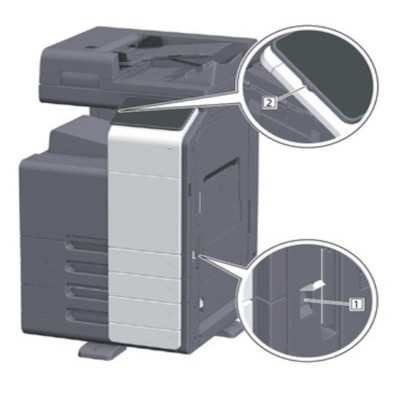
STEP 2 – Check to see that the Main Power Switch and the Power Key are turned ON. The Main Power Switch will be located nearby of the bypass tray. I Icon is indicated ON and O Icon is indicated OFF.
ADDITIONAL STEPS:
- If machine fails to start, turn OFF the main power switch and unplug the power cord of the machine.
- Plug back in the power cord after 15 seconds or more, turn ON the Main Power Switch and check if the machine starts correctly.